Connect Token Saver to your AI host
Choose your harness for exact setup, OAuth, verification, and host instructions, then run the complete tier-first lifecycle.
initialize and tools/list answer 401 with a WWW-Authenticate challenge until the host holds a valid token, which is what makes a host show its Connect or Authenticate button. Only setup_elis_host_instructions is callable without a token. The consent screen links the host to your Elis account and the Personal or organization billing scope you choose.https://tryelisai.com/mcp, wait for it to report ready, and retry.Choose your harness
Each tab is a complete setup path and has a shareable ?harness=... URL. Do not substitute one harness's endpoint or configuration keys for another.
Codex App setup
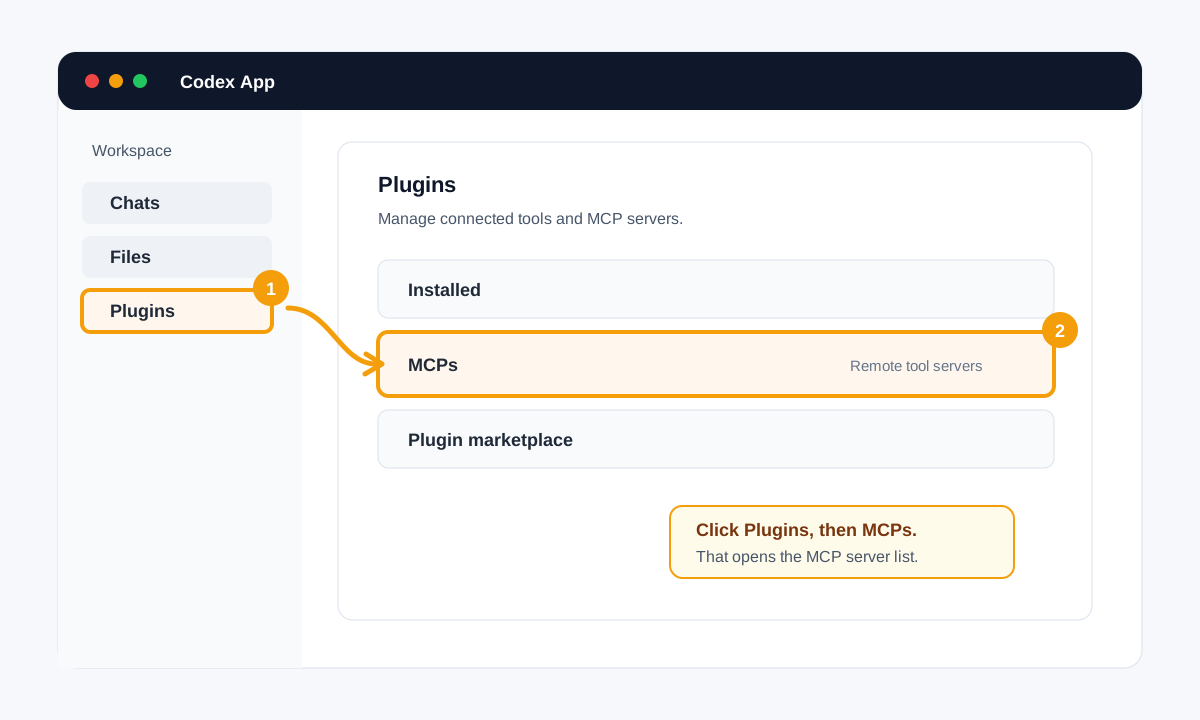
Use this path in the Codex desktop app: its MCP servers live under Settings → Plugins (“Manage plugins, skills, and MCPs”). Codex also reads [mcp_servers.*] entries from ~/.codex/config.toml at launch.
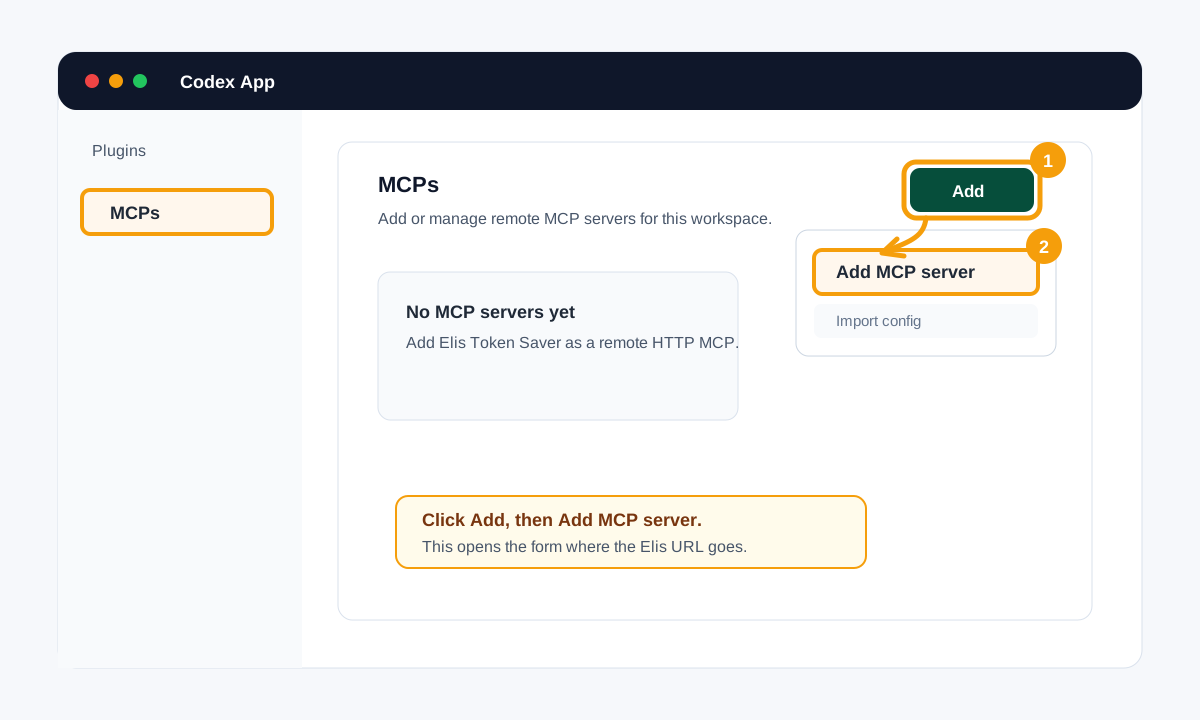
1. Open the configuration
Settings → Plugins → Add → Add MCP server (installed servers are listed under the MCPs tab)
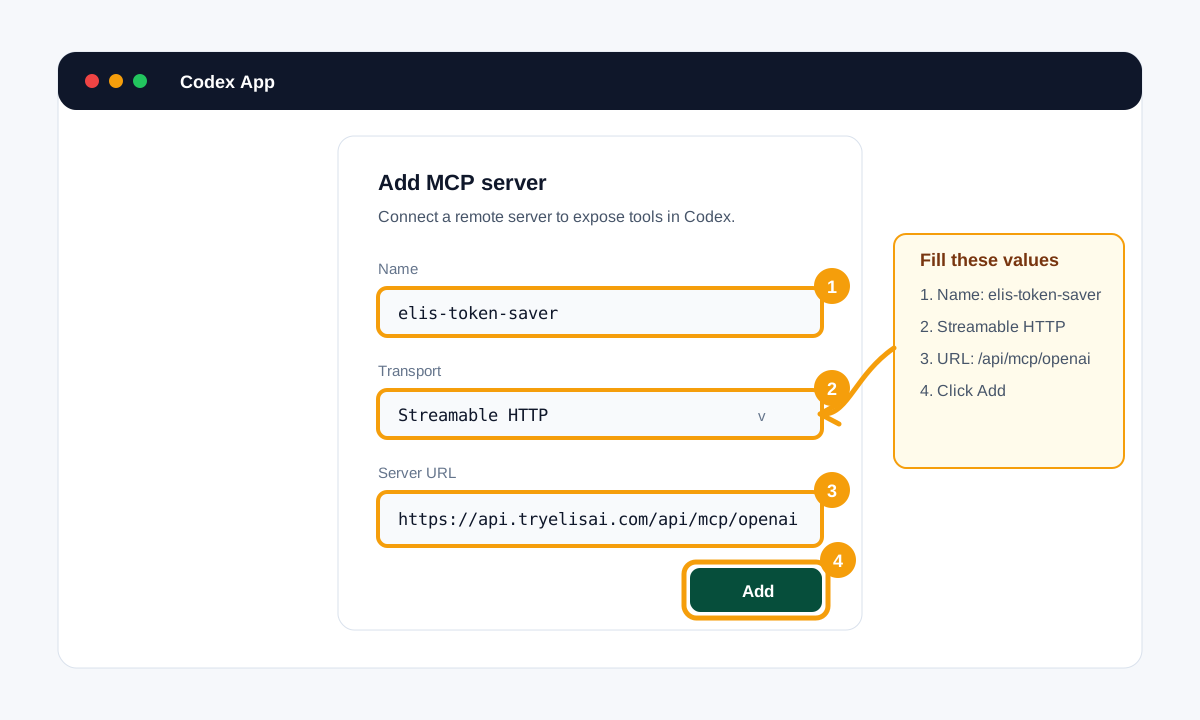
2. Add Elis Token Saver
Connection type: Server URL
Server URL: https://api.tryelisai.com/api/mcp/openai

# equivalent ~/.codex/config.toml entry (read when Codex starts)
[mcp_servers.elis_token_saver]
enabled = true
url = "https://api.tryelisai.com/api/mcp/openai"
3. Authorize
- Save the server. Codex registers with Elis over OAuth when it connects: finish the Elis sign-in, approve the token_saver scope, and the server shows Authenticated (OAuth). When that expires the server card reads “Authentication expired. Reconnect to keep using this MCP server” with a Reconnect button. If your Codex build offers no sign-in action, use the programmatic PKCE flow below.
- Choose Personal or an organization on the consent screen. That choice controls billing and private-chain scope.
4. Verify the connection
- Open the server in Settings → Plugins → MCPs and confirm it is enabled (Enable MCP server / Disable MCP server) and Authenticated (OAuth); inside a thread, /mcp shows MCP server status.
- Start a fresh task and ask Codex to use start_elis_token_saver_plan before substantive work.
- If the tools are missing, restart Codex after installing the host files below.
5. Install the host behavior
AGENTS.md (managed block)
.codex/agents/elis.toml
~/.codex/prompts/elis.md
setup_elis_host_instructions previews these files: the always-on rule lands as a managed block in AGENTS.md, the executor is project-scoped, and the /elis prompt is user-global because Codex reads custom prompts from $CODEX_HOME/prompts. Keep the always-on rule in AGENTS.md; a project .codex/prompts directory is not loaded.
Endpoint: https://api.tryelisai.com/api/mcp/openai
References: Complete Elis setup reference
Run the complete Elis lifecycle
Connecting the server only exposes tools. The host must still use the same cursor for the whole plan and execute only the tasks Elis discloses. Every ready task includes an authoritative recommended_model_size of nano, small, or frontier. A named model is optional host guidance, not a hardcoded binding.
1. start_elis_token_saver_plan({ goal, setup_version?, speed_mode?, host_billing?,
     constraints?, chain_hint?, session_id? })      // a quote: no tasks are revealed yet
2. submit_elis_task_plan({ plan_id, tasks })          // only when start returned decomposition_request
3. get_next_elis_task({ plan_id })                    // first call: reserves the estimate and reveals
                                                       // ready_tasks plus the first graph_revision
4. Execute every ready task with its execution_handoff and size tier
5. get_next_elis_task({
     plan_id,
     graph_revision,                                   // from the task's execution_handoff
     results: [{ task_id, status, summary | error, evidence?, steps?, artifacts?,
                 usage: { model, model_tier, input_tokens, output_tokens, duration_ms? } }]
   })                                                  // one item per finished task; usage goes INSIDE each item
   // a sequential host may send one previous_result (+ a top-level usage) instead
6. Repeat 4-5 until done: true; a new graph_revision invalidates un-reported work
7. finish_elis_plan({ plan_id, final_answer, total_tokens_used, usage, feedback?, store? })
   // print the response's report_card.lines verbatim; continuation_hint = next task is a NEW plan
Task status is ok, failed, blocked, skipped (needs a reason and evidence, or the task stays open), or refined (only for a task that carried a refinement_offer, together with replan_request.refine_task_id in the same call). A failed task is retried once, then the rest of the graph is replanned; the response's transition is retry, replan, or abort. Work you discover mid-run is not a failure: append it with replan_request { reason, proposed_tasks }, which bumps graph_revision. A report that carries output is not stored; put the result in summary (or error) and evidence.
execution_handoff, completes that one task, reports actual model and token usage, and returns control. It does not start a second plan.report_card.lines: the usage extension (how much further the run stretched a subscription usage window) and the measured savings. /elis prints them verbatim at the end of every run. Details in MCP Tools & Tier-First Lifecycle.decomposition_request has two variants, keyed by action. decompose_goal_into_tasks is a recall miss: split the goal yourself. rederive_recalled_instructions means a proven chain's shape was recalled: keep every task_id and dependency in recalled_topology and rewrite only each task's instruction. When the request lists blocked_tools, do not plan tasks that need them.setup_elis_host_instructions returns carries a BEGIN ELIS TOKEN SAVER MCP manifest=<hash> marker. Pass that hash as setup_version on every start; when the response's setup_status.update_needed is true, rerun the setup tool, re-apply its files, and start a new host session.Authorize a host without built-in OAuth
A raw JSON-RPC client must implement OAuth itself. First read public discovery metadata, register a public client, create an S256 PKCE challenge and state, open consent, validate the returned state, exchange the one-time code, and send the access token in the header.
Show the programmatic OAuth checklist
- Read
https://api.tryelisai.com/.well-known/oauth-authorization-server. - POST
{"client_name":"my-host","redirect_uris":["http://localhost:8765/callback"]}tohttps://api.tryelisai.com/oauth/registerand retain the returned publicclient_id. Redirect URIs must behttps, orhttpon a loopback host; the201carries no client secret. - Generate a random
code_verifier, its base64url SHA-256code_challengewithout padding, and a randomstate. - Open
/oauth/authorizewithresponse_type=code, theclient_id, the exact redirect URI,code_challenge_method=S256, scopeprofile token_saver, the state, andresourceset to the exact mount URL you will call (one of the four host mounts). The token is bound to that mount and refused on any other. - Verify state, then POST the code, client id, verifier, exact redirect URI, resource, and
grant_type=authorization_codeto/oauth/token(form or JSON). The code is single-use. The response is{ access_token, token_type, expires_in, refresh_token, scope, resource }; access tokens last 30 days by default. Refresh withgrant_type=refresh_tokenplus therefresh_tokenandclient_id(single-use, rotated) instead of re-running consent. - Call the selected MCP endpoint with
Authorization: Bearer <access_token>. Keep tokens out of URLs and logs.
The same steps, with the live discovery, registration, and token endpoints filled in, come back in the authentication.programmatic block of setup_elis_host_instructions, which needs no token. A 401 body also carries oauth_discovery_url, and its WWW-Authenticate header carries the resource_metadata pointer. General setup lives in the full setup reference.
Use recall and privacy controls deliberately
A successful authenticated finish can store a proven chain privately in the selected Personal or organization scope. Future similar goals can recall that task sequence. Report honest ok, failed, blocked, skipped, or refined task status and actual usage so prediction and savings audits compare against real execution.
// Do not store or recall this plan
start_elis_token_saver_plan({ goal, constraints: { no_store: true } })

// Keep private recall, but exclude this plan from community sharing
start_elis_token_saver_plan({ goal, constraints: { no_community: true } })

// Recall a known private proven chain for a similar goal
start_elis_token_saver_plan({ goal, chain_hint: "elis_chain:<sig>:<plan_id>" })
finish_elis_plan returns chain_hint as { hint, usage }, and only when the chain was stored and graded proven; pass chain_hint.hint back on a later start. Report steps and evidence on every task: a plan graded below the proven floor stores no chain and returns no hint.
Troubleshoot the common failures
- No tools: confirm the exact harness endpoint, Streamable HTTP config, host trust/enablement, and workspace MCP policy. Then refresh tools or restart the host.
- oauth_required or invalid_token: on
initialize,tools/list, or atools/callwith no bearer the body is HTTP 401{ error, oauth_required, auth_action: "open_auth_url_and_wait", auth_url, login_url, startup_url, oauth_discovery_url }; on atools/callwith an expired, wrong-mount, or under-scoped token it is a JSON-RPC error (code-32001,data= the same payload). Openauth_urlfor the user and retry; do not continue anonymously.startup_urlonly wakes the server. A token minted for one mount is refused on another. - insufficient_scope: 403 on
tools/call. Reconnect and consent again withtoken_saverin scope. - payment_method_required: a tool result with
payment_method_required: trueand abilling_url. Open the returnedbilling_url, attach a payment method to the selected scope, then retry the lifecycle call. - rate_limited: HTTP 429 / JSON-RPC
-32005withretry_afterin seconds. Back off for that long; never retry in a loop. - plan_forbidden or plan_not_found: JSON-RPC
-32003/-32004. Usually an anonymous plan continued without itsanonymous_client_id, or a plan from another account or scope. - stale_graph_revision: you reported against an old
graph_revision. Discard un-reported work from it, re-readready_tasks, and report against the revision in the new handoff. - skip_requires_reason_and_evidence: a
skippedreport needs both fields; the task stays open until it has them. - First request times out: wake the API at
https://tryelisai.com/mcpand retry after it reports ready. - /elis missing or setup_status.update_needed: apply every file returned by
setup_elis_host_instructionsand start a new host session. Gemini CLI can reload commands with/commands reload.
For tool schemas, usage fields, tier semantics, grounding, and finish behavior, continue to MCP Tools & Tier-First Lifecycle.