Copilot Embed API
Provision the website Copilot Assistant from code: enable the feature, create embeds and site sources over REST, install the loader on any stack, and understand the visitor protocol and its security model.
Understand the two surfaces
The Copilot Assistant is two protocols sharing one embed record:
- Management API —
/api/companies/{company_id}/copilot-embeds*andcopilot-site-sources*. Authenticated with a Bearer JWT or anX-API-Keyheader, gated by org role (creating or updating an embed needsadmin; reading needsdev). This is what your backend or CI calls to provision embeds. - Public visitor protocol —
/api/embed/copilot/*. No user login at all. Every call carries anX-Embed-Sessiontoken that is minted server-to-server, never a key the visitor’s browser asserts for itself.
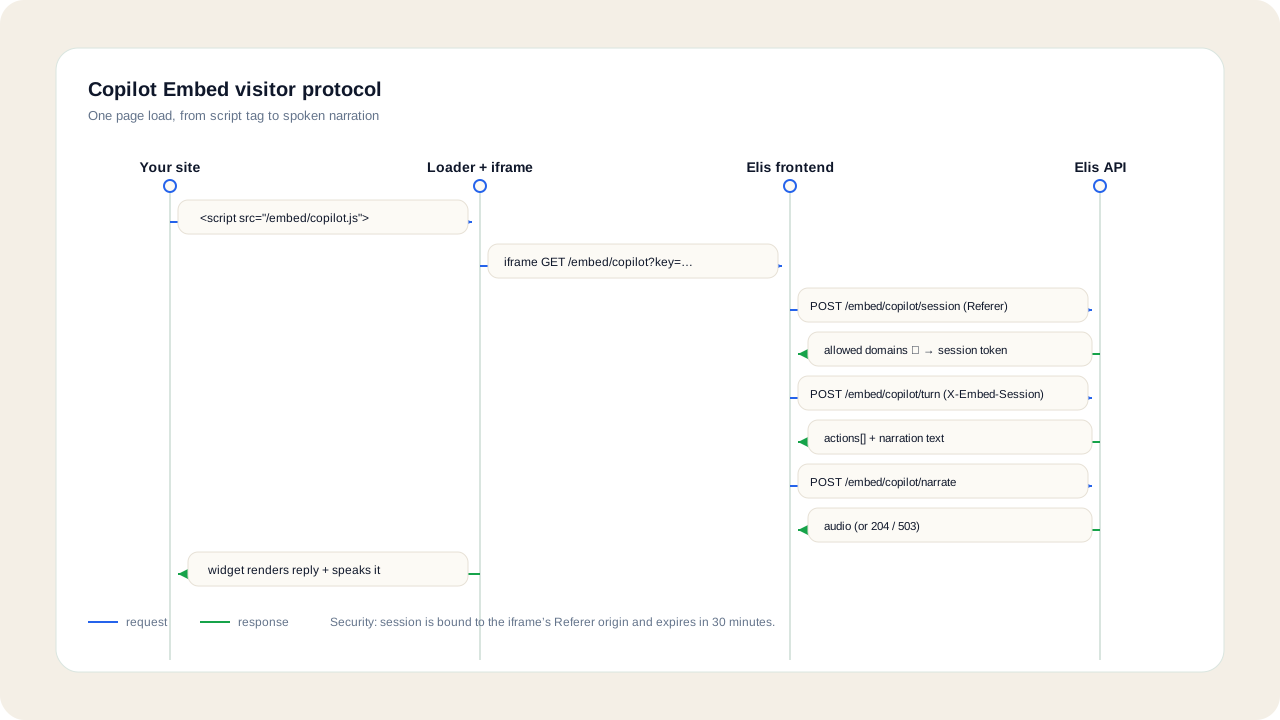
The request flow for one page load:
- Your site loads the loader script,
/embed/copilot.js. - The loader opens an iframe at
/embed/copilot?key=…. - While that iframe document renders, the server mints an origin-bound session token from the
Refererthe browser set on the iframe navigation, checked against the embed’s allowed domains. - The widget inside the iframe calls
POST /api/embed/copilot/turnandPOST /api/embed/copilot/narrate, each withX-Embed-Sessionset to that token.
Enable the feature on your deployment
Every embed endpoint 404s with {"error":"feature_disabled"} until the master switch is on. Set these on the backend (and mirror the internal token on the frontend service):
| Variable | Purpose |
|---|---|
EMBED_COPILOT | Master switch. Set to 1 to enable the embeddable copilot; when off, every /api/embed/copilot/* and copilot-embeds* route returns 404 with feature_disabled. |
EMBED_INTERNAL_TOKEN | Required to mint sessions. The frontend server sends it as X-Embed-Internal when calling POST /api/embed/copilot/session — the backend and frontend services must share the exact same value. |
EMBED_PREVIEW_HOST | Enables the Preview panel. Must be a different hostname than the app itself — production uses preview.<domain>, local dev uses 127.0.0.1:8000. Preview is off wherever this is unset. |
EMBED_COPILOT_WRITES | Deployment-wide master for write actions (click / type / select). One of three locks — see Step 6. |
EMBED_REQUIRE_PAID_ORG | Gates the public visitor endpoints on the owning org having an active subscription. |
NEXT_PUBLIC_INAPP_COPILOT | Set to 1 to mount the in-app sibling assistant inside Elis itself (not the embeddable widget covered by this tutorial). |
| Site-ingest knobs | EMBED_SITE_MAX_PAGES, EMBED_SITE_FETCH_TIMEOUT_S, EMBED_SITE_JS_RENDER_FALLBACK, EMBED_SITE_JS_RENDER_TIMEOUT_S, EMBED_SITE_JS_RENDER_MAX_PAGES — bound how much of a site the Site Sources crawler will fetch and how it falls back to a rendered fetch for JS-heavy pages. |
EMBED_INTERNAL_TOKEN to the browser. It authorizes minting a visitor session server-to-server; the public key in your install snippet is the only thing that belongs in page source.Create an embed
Two ways to create one, both under /api/companies/{company_id}/copilot-embeds*. Quick setup derives the domain and allowed origins from a single URL and starts indexing in the background:
curl -X POST https://api.tryelisai.com/api/companies/COMPANY_ID/copilot-embeds/quick-setup \
  -H "X-API-Key: YOUR_API_KEY" \
  -H "Content-Type: application/json" \
  -d '{"site_url": "acme.com"}'

# 201:
# {"embed": { ...CopilotEmbed }, "source": { ...CopilotSiteSource | null }}
Advanced create gives full control over the name, domain, and allowed origins instead of deriving them:
curl -X POST https://api.tryelisai.com/api/companies/COMPANY_ID/copilot-embeds \
  -H "X-API-Key: YOUR_API_KEY" \
  -H "Content-Type: application/json" \
  -d '{
    "name": "Marketing site",
    "site_domain": "www.acme.com",
    "allowed_domains": ["https://www.acme.com"]
  }'
Both return a CopilotEmbed with:
id, company_id, name, public_key, billing_user_id, site_domain, allowed_domains[], appearance{}, voice_enabled, tts_voice, guidance_enabled, writes_enabled, submit_enabled, persona, speed_mode, agent_id, web_access_enabled, enabled_sources{}, rate_limits{}, tour, created_by, revoked_at, created_at, updated_at.
Error codes on either call:
invalid_site_url— quick setup could not parse the given URL as a website address.byok_only_billing_user— the billing user’s account is in BYOK-only mode, which can’t back embed billing.billing_user_not_member— the given (or default) billing user is not an active member of the org.
Add and sync site knowledge
Discover candidate sitemaps for a base URL before committing to a source:
curl -X POST https://api.tryelisai.com/api/companies/COMPANY_ID/copilot-site-sources/discover \
  -H "X-API-Key: YOUR_API_KEY" \
  -H "Content-Type: application/json" \
  -d '{"base_url": "https://www.acme.com"}'

# {"sitemaps": [{"url": "https://www.acme.com/sitemap.xml", "page_count": 84}, ...]}
Create a source with kind of sitemap (needs sitemap_url), auto (needs base_url; discovery then a bounded same-domain crawl), or manual (needs base_url; you supply the page list on sync, not on create):
curl -X POST https://api.tryelisai.com/api/companies/COMPANY_ID/copilot-site-sources \
  -H "X-API-Key: YOUR_API_KEY" \
  -H "Content-Type: application/json" \
  -d '{"kind": "auto", "base_url": "https://www.acme.com"}'
Then trigger a sync. By default a sync is incremental — pages already ready are kept and not re-fetched; pass {"force_full": true} to force a from-scratch refresh, or {"urls": [...]} to hand a manual source its page list:
curl -X POST https://api.tryelisai.com/api/companies/COMPANY_ID/copilot-site-sources/SOURCE_ID/sync \
  -H "X-API-Key: YOUR_API_KEY" \
  -H "Content-Type: application/json" \
  -d '{}'

# 202: {"source_id": "SOURCE_ID", "status": "syncing", "resume": true}
Poll GET /api/companies/COMPANY_ID/copilot-site-sources and watch status move pending → syncing → ready or failed, alongside page_count and chunk_count. Each crawled page becomes a document; content that hasn’t changed since the last sync is hash-skipped rather than re-embedded.
Uploaded documents go through the org documents endpoint instead — uploadDocument(companyId, file, "reference") — and appear in the Documents screen alongside crawled pages.
Install the loader
The install snippet is the same one line everywhere: a script tag pointed at https://app.tryelisai.com/embed/copilot.js carrying the embed’s public key.
HTML
<!-- Elis Copilot — paste before </body> -->
<script src="https://app.tryelisai.com/embed/copilot.js" data-key="elis_emb_…" async></script>
Next.js
// app/layout.tsx
import Script from "next/script";

export default function RootLayout({ children }: { children: React.ReactNode }) {
  return (
    <html>
      <body>
        {children}
        <Script
          src="https://app.tryelisai.com/embed/copilot.js"
          data-key="elis_emb_…"
          strategy="afterInteractive"
        />
      </body>
    </html>
  );
}
WordPress
// functions.php
add_action('wp_footer', function () {
    echo '<script src="https://app.tryelisai.com/embed/copilot.js" data-key="elis_emb_…" async></script>';
});
Google Tag Manager
Custom HTML tag, trigger All Pages, tag content creates the script element with the data-key attribute:
<script>
  (function () {
    var s = document.createElement('script');
    s.src = 'https://app.tryelisai.com/embed/copilot.js';
    s.async = true;
    s.setAttribute('data-key', 'elis_emb_…');
    document.body.appendChild(s);
  })();
</script>
The key is printed straight into your page source, so it is not a secret — anyone can read it. What actually gates a session is the allowed-domain check against the iframe’s Referer, the Content-Security-Policy frame-ancestors list served by GET /api/embed/copilot/frame-ancestors?key=… (which browsers enforce before a session is even requested), and the per-visitor / per-IP / per-org quotas.
The visitor protocol
The widget talks to one endpoint per turn, authenticated by the session token from Step 1:
POST /api/embed/copilot/turn
X-Embed-Session: <session token>
Content-Type: application/json

{
  "visitor_id": "…",
  "message": "Where do I find pricing?",
  "route": "/pricing",
  "snapshot": [ /* compact page accessibility snapshot */ ],
  "page_context": { /* optional page metadata */ },
  "history": [ /* last 10 exchanges */ ],
  "last_action": { "expect": "…", "ops": [ /* … */ ], "signals": { /* … */ } },
  "act_for_me": false,
  "progress": { "visited_routes": ["/pricing"], "hop": 1, "max_hops": 6 }
}
Response:
{
  "actions": [ /* ops to run on the host page */ ],
  "narration": "…",
  "expect": "…",
  "requires_consent": false,
  "goal_complete": true,
  "model": "…",
  "sources": [ { "title": "…", "url": "…" } ]
}
Op vocabulary: navigate, highlight, and explain are read-only and always available. click, type, and select require writes to be on. submit requires the separate submit opt-in. Every op targets an element by role + name, never a raw selector or ref.
Turn-level caps (400):
message_required— empty message.message_too_long— overEMBED_MSG_MAX_CHARS(default 2000).snapshot_too_large— overEMBED_SNAPSHOT_MAX_NODES(default 200) accessibility nodes.
A run can span up to 6 hops (progress.max_hops): after each action batch the widget reports whether the route or snapshot actually changed, so the planner verifies its own step before continuing.
Narration is a separate call with its own status contract:
POST /api/embed/copilot/narrate
X-Embed-Session: <session token>

{ "visitor_id": "…", "text": "…" }

# 204 — voice not enabled on this embed; stop asking for the rest of the session
# 200 with an empty body — nothing to play for this beat: nothing speakable, or the
#   configured voice cannot speak right now (visitors get text only, with no error to
# read, and the organization's admins are alerted); skip it, keep voice on, retry nextTune appearance and limits over REST
Everything on the Appearance and Usage & Limits screens is one PATCH away:
curl -X PATCH https://api.tryelisai.com/api/companies/COMPANY_ID/copilot-embeds/EMBED_ID \
  -H "X-API-Key: YOUR_API_KEY" \
  -H "Content-Type: application/json" \
  -d '{
    "appearance": { "title": "Acme Assistant", "greeting": "Hi! Ask me anything about this site." },
    "voice_enabled": true,
    "tts_voice": "cartesia:helpful-woman",
    "guidance_enabled": true,
    "writes_enabled": false,
    "submit_enabled": false,
    "persona": "Lead with product docs, stay off pricing negotiation.",
    "speed_mode": "",
    "agent_id": "",
    "web_access_enabled": false,
    "enabled_sources": { "doc_types": [], "datasource_ids": [], "site_source_ids": [] },
    "rate_limits": { "turns_per_visitor_day": 20, "turns_per_ip_day": 40, "turns_per_org_day": 1500, "burst_per_min": 8 }
  }'
appearance is stored as a free-form object; the manager UI writes title, greeting, and brand_color (default #6d5cff) into it. speed_mode accepts "" (Auto), instant, fast, medium, or deep — these are answer-depth modes, not a model choice; the concrete model is still resolved dynamically from the org’s miner pool at dispatch time.
enabled_sources decides what a visitor can be answered from. With no site_source_ids or doc_types picked the assistant answers only from the crawled pages of its own website (the pages whose host is its site_domain or one of its allowed_domains). Setting "all_org_documents": true (a JSON boolean, off by default) is the explicit opt-in that also lets it use every unclassified organization document; picked sources always win over it.
rate_limits overrides can only lower the deploy ceilings, never raise them:
| Override key | Ceiling env var | Default |
|---|---|---|
turns_per_visitor_day | EMBED_TURNS_PER_VISITOR_DAY | 30 |
turns_per_ip_day | EMBED_TURNS_PER_IP_DAY | 60 |
turns_per_org_day | EMBED_TURNS_PER_ORG_DAY | 2000 |
burst_per_min | EMBED_BURST_PER_MIN | 10 |
Narration has its own, speech-sized ceilings: EMBED_NARRATE_PER_VISITOR_DAY (400), EMBED_NARRATE_PER_IP_DAY (800), EMBED_NARRATE_PER_ORG_DAY (20000), and EMBED_NARRATE_BURST_PER_MIN (60).
Rotate or revoke a key without deleting the embed record:
# Issue a new public key — the old snippet stops working immediately
curl -X POST https://api.tryelisai.com/api/companies/COMPANY_ID/copilot-embeds/EMBED_ID/rotate-key \
  -H "X-API-Key: YOUR_API_KEY"

# Revoke — the snippet stops working immediately
curl -X DELETE https://api.tryelisai.com/api/companies/COMPANY_ID/copilot-embeds/EMBED_ID \
  -H "X-API-Key: YOUR_API_KEY"
Read usage and audit
Per-day usage for one embed:
curl "https://api.tryelisai.com/api/companies/COMPANY_ID/copilot-embeds/EMBED_ID/usage?days=30" \
  -H "X-API-Key: YOUR_API_KEY"

# {"embed_id": "...", "days": 30,
#  "daily": [ {"turns": 12, "narrations": 4, "tokens": 8100, "unique_visitors": 9}, ... ],
#  "totals": {"turns": ..., "narrations": ..., "tokens": ...}}
The same company scope exposes the preview endpoint (POST …/copilot-embeds/EMBED_ID/preview) and its share links, so you can generate a one-off link that shows the assistant running on one of the embed’s allowed pages before you ship the snippet.
Every management action — embed created / updated / revoked / key rotated, site source created / synced / deleted — is written to the org audit log automatically.
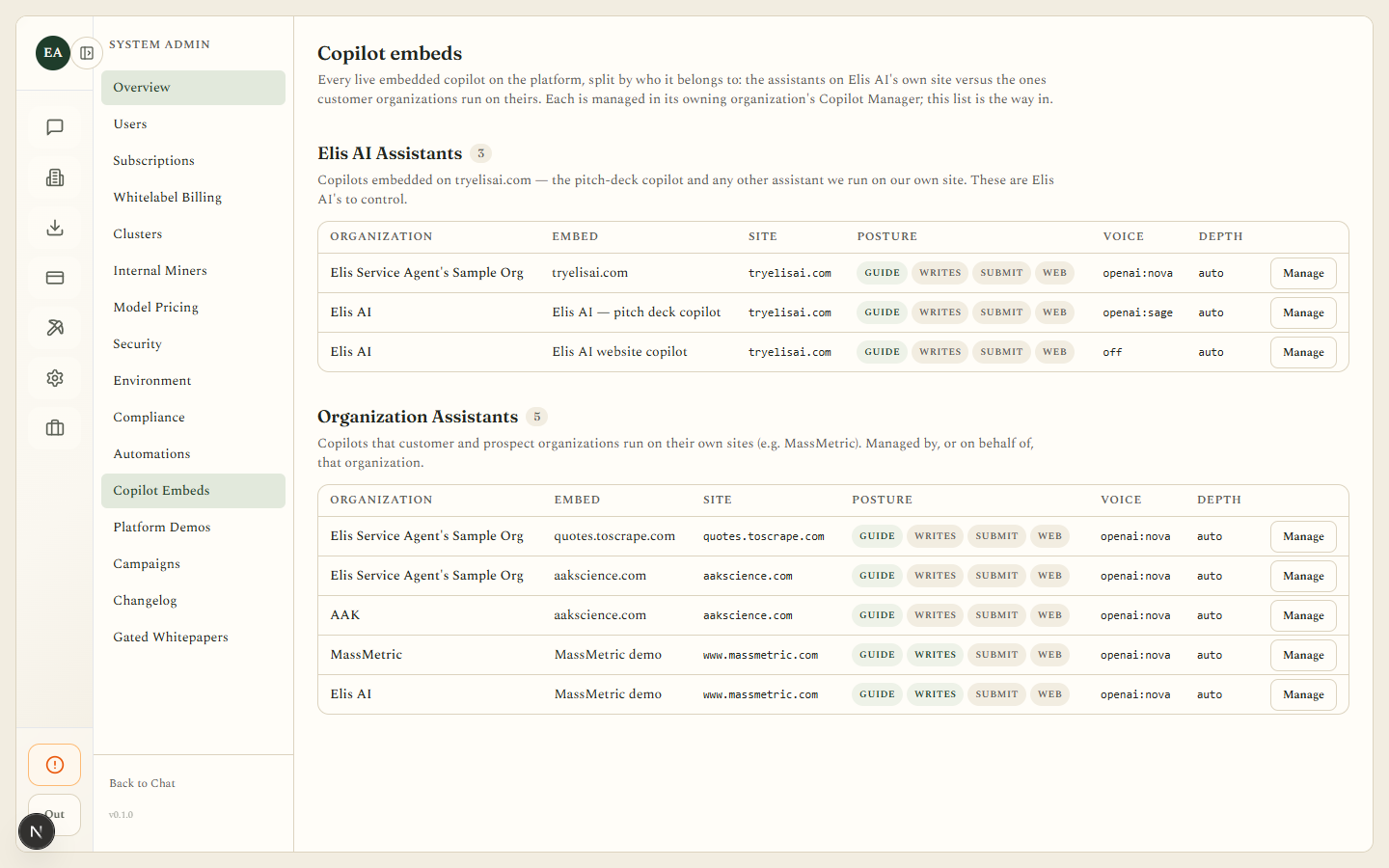
Platform operators can see every embed across every org at /system-admin/copilot, backed by GET /api/system-admin/copilot-embeds — split into Elis AI’s own assistants and every customer/prospect organization’s assistants, each row showing its organization, embed, site, posture (guide / writes / submit / web), voice, and answer depth, with a Manage link into that org’s own Copilot Manager.